How to Check Labour Card Status UAE Online with MoHRE
Follow the screens. Check your permit. View, download or print your labour card.
Published
Not every person in UAE can start working in companies or agencies. Instead, they need proper employment authorization to work legally. To work legally, the government provides them with a UAE labour card, which is an employment document that contains all details about an employee.
Moreover, a labour card also contains details about the employer and work permit. After getting employed, people have to regularly check their labour card status to know about their work permit. The online status checks whether the permit is active, pending, or expired.
You can check the status online from the MoHRE online portal or mobile app. This service also removes the hassle of visiting a physical government office to get work permit information.
In this guide, we will explore how to check labour card status in the UAE online, download your electronic labour card, and more.
How to Check Labour Card Status in UAE Online?
Use the official enquiry portal to look up your electronic work permit. Keep your application or transaction details ready.
- 01
Open the official enquiry portal
Visit the MoHRE Enquiry Portal. Find the Choose a Service menu on the enquiry page.
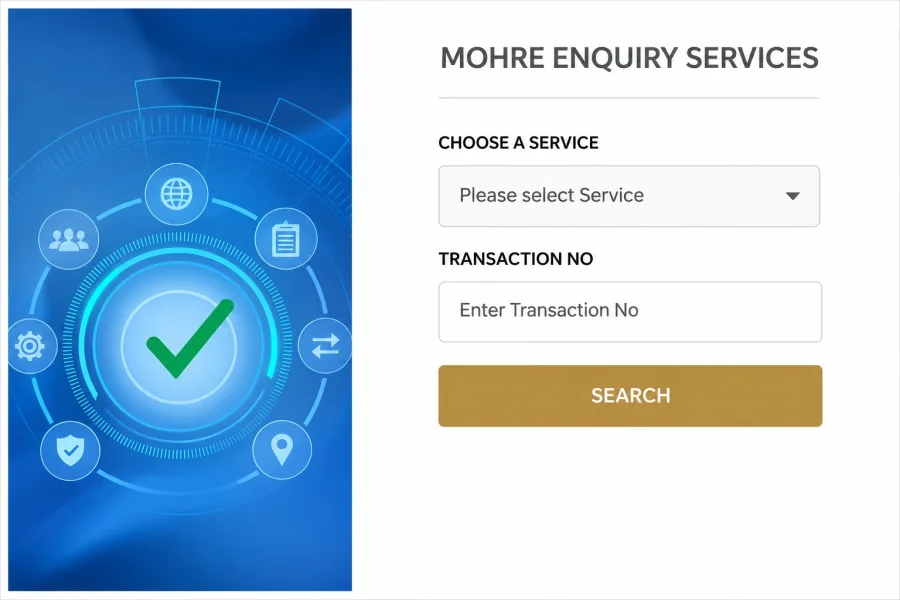
- 02
Select Electronic Work Permit Information
Open the service menu and choose Electronic Work Permit Information. This opens the lookup for your permit details.
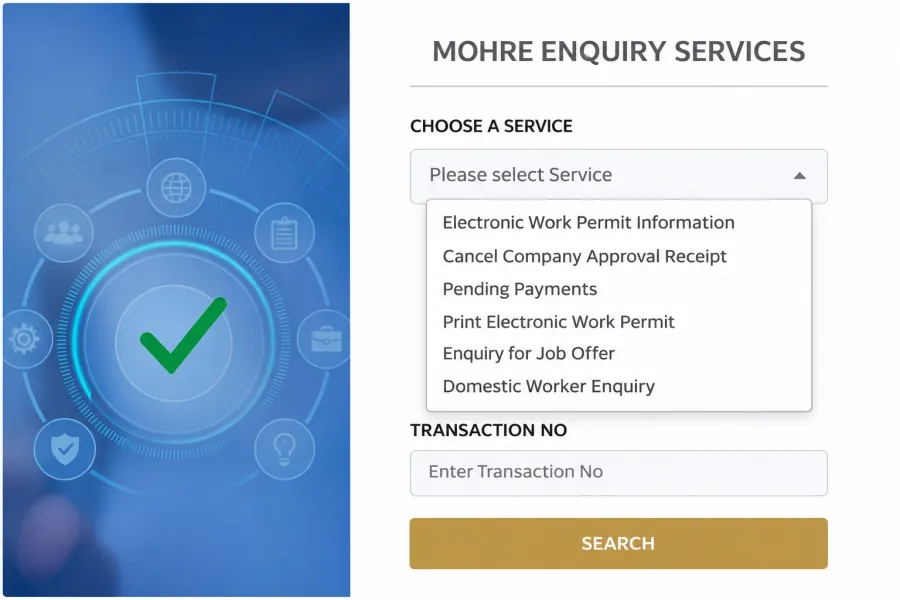
- 03
Enter your details and search
Enter the transaction number or other details requested by your selected service. Complete any displayed verification, then select Search.
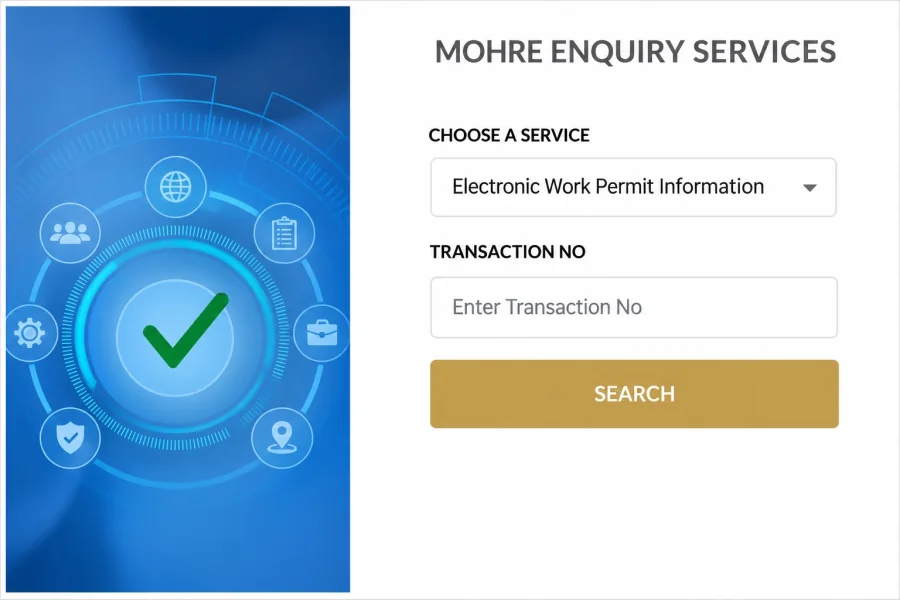
- 04
Review your permit information
Review the available work permit record, including the permit number, expiry date and status. If the information is missing or still pending, ask your employer or HR team to check the application.
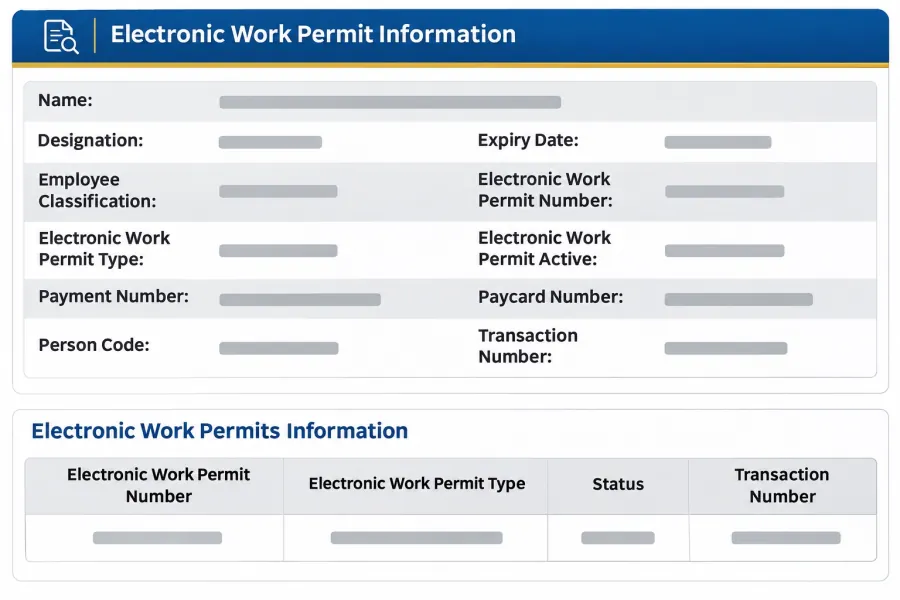
How to Check UAE Labour Card Status Through the MoHRE App?
Open the official MoHRE app on your phone. The screens below follow the UAE Pass sign-in and employee profile route.
- 01
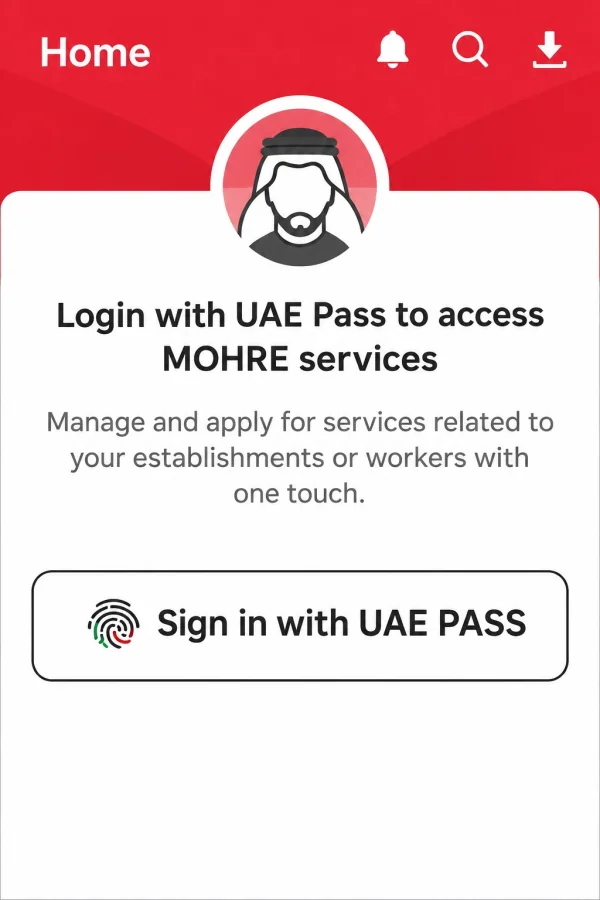
Sign in with UAE Pass
On the MoHRE home screen, select Sign in with UAE PASS. Use the UAE Pass account linked to your own identity.
- 02
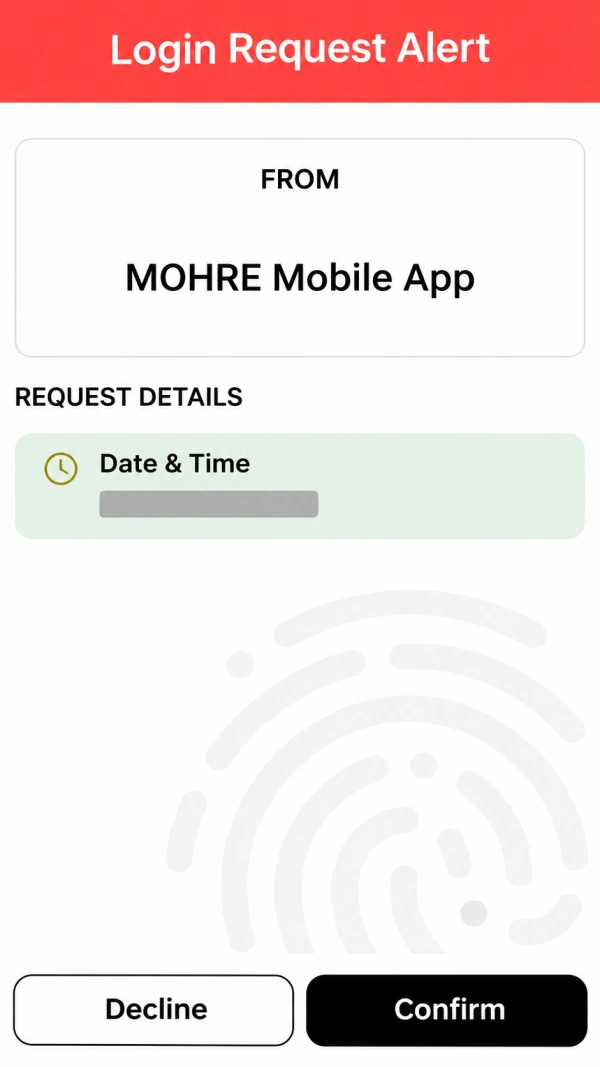
Approve your login request
UAE Pass displays a login request from MOHRE Mobile App. Check the request, approve the login you started, and return to MoHRE.
- 03
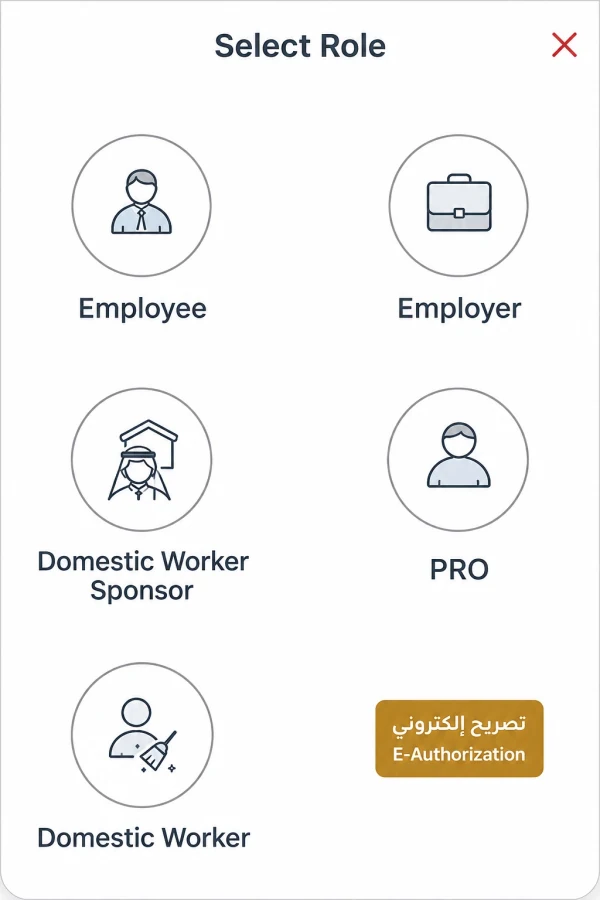
Choose the Employee role
If the app asks you to select a role, choose Employee to access your employment information.
- 04
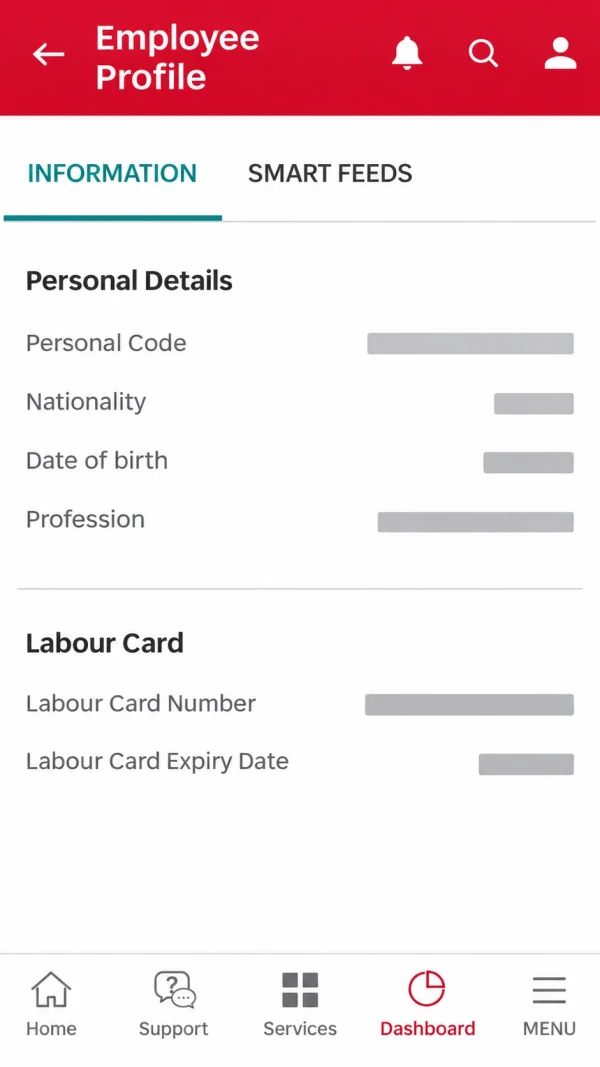
Open your employee information
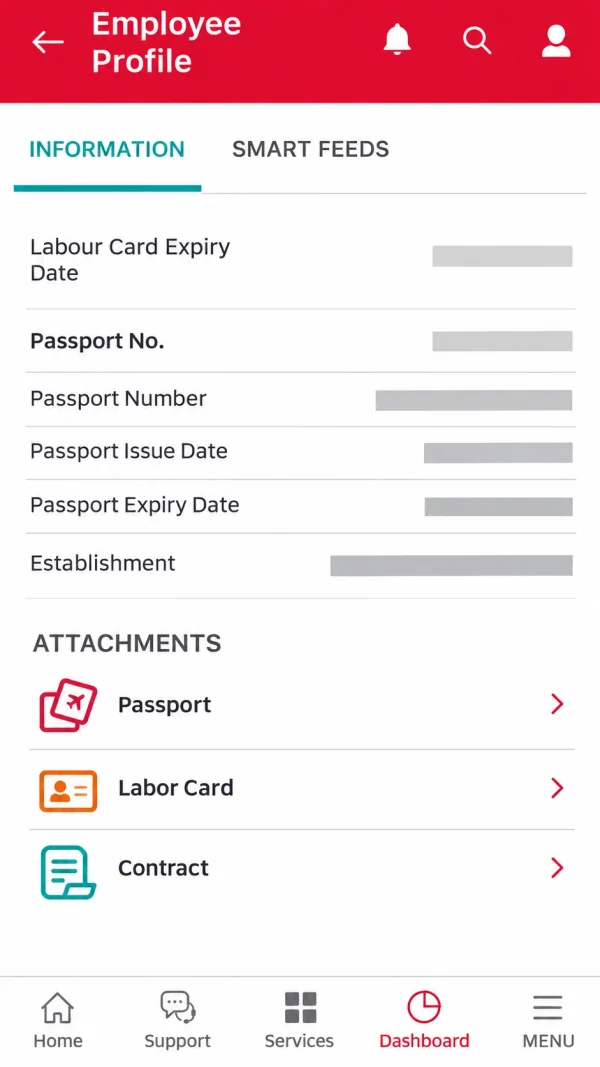
Open your employee profile or dashboard. Select the Information tab and scroll to the Labour Card details.
- 05
Check your card and attachments
Review the available card details and expiry information. In Attachments, select Labor Card to open the available document.
How to Check Your Labour Card Through UAE Pass?
UAE Pass also has a document wallet. The request route below lets you look for a Labour Card document issued by MoHRE.
- 01
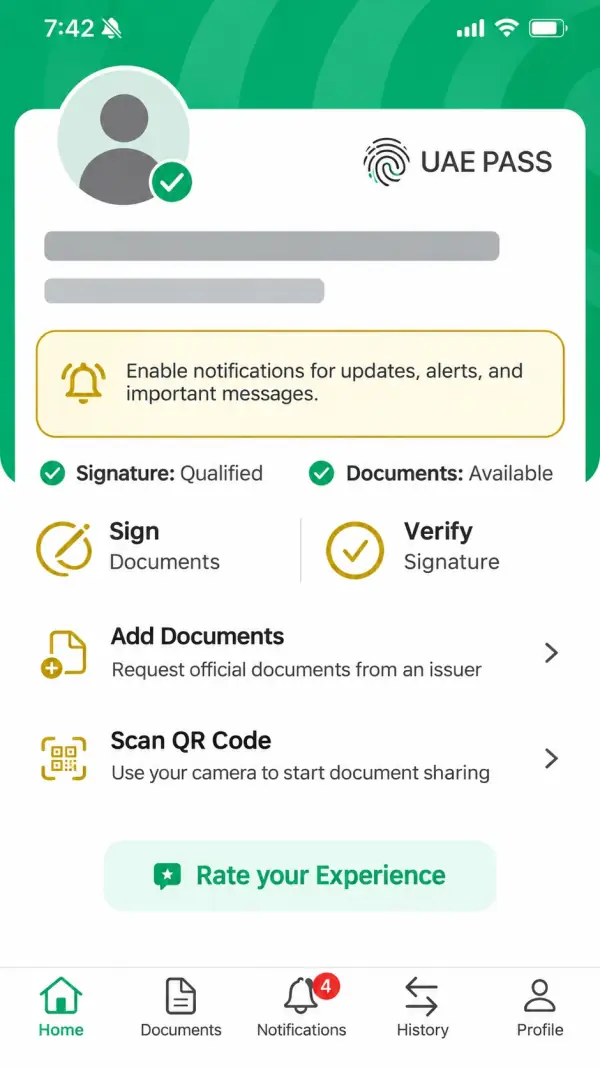
Open UAE Pass
Open UAE Pass and sign in to your verified account. On the home screen, locate Documents in the bottom navigation.
- 02
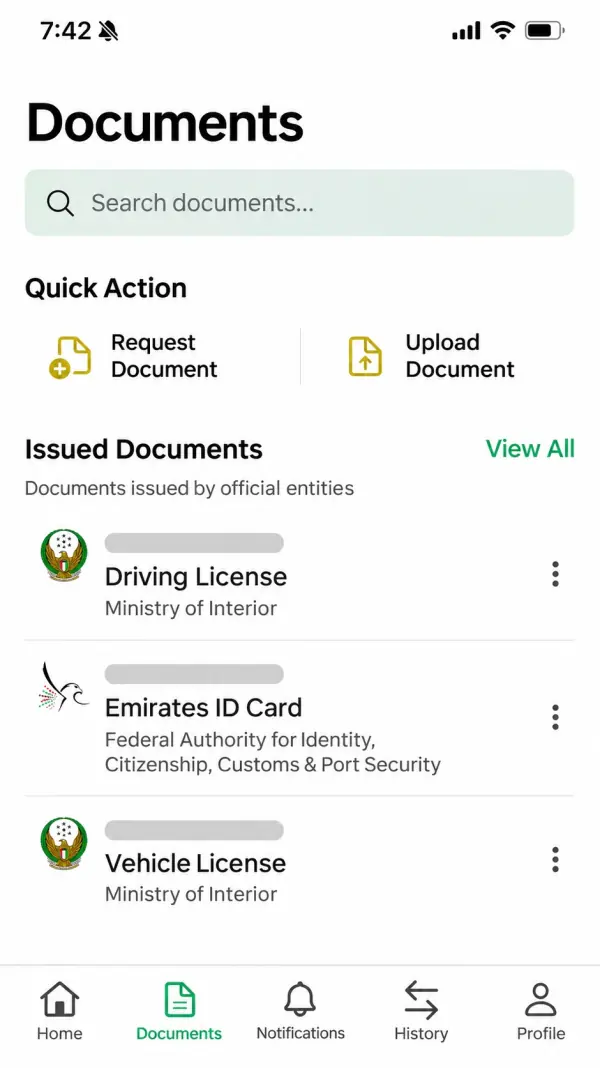
Go to Documents
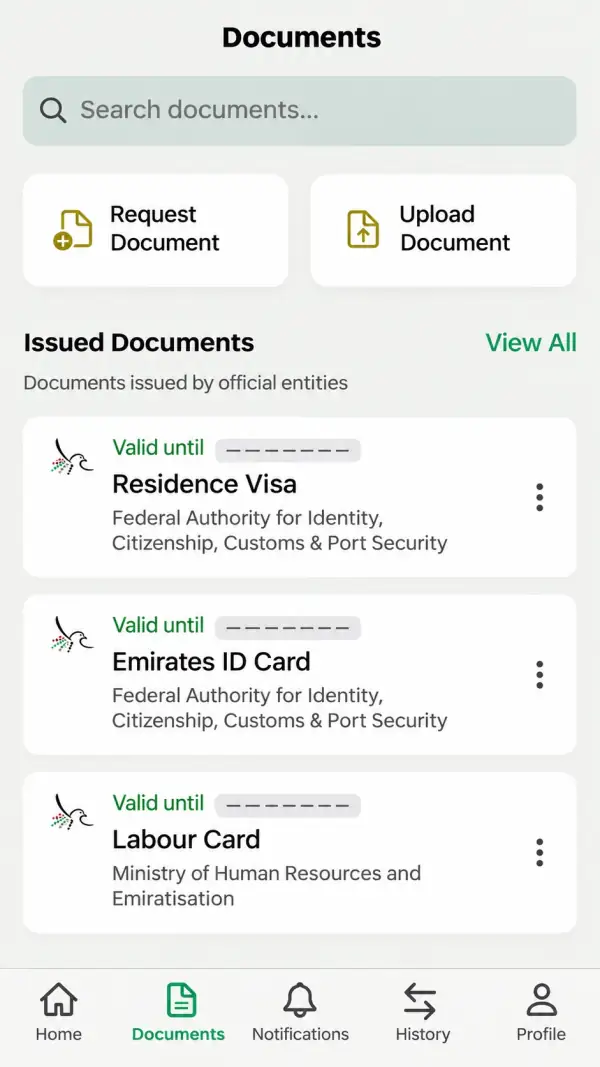
Select Documents. If the Labour Card is already in your issued documents, open it. Otherwise, select Request Document.
- 03
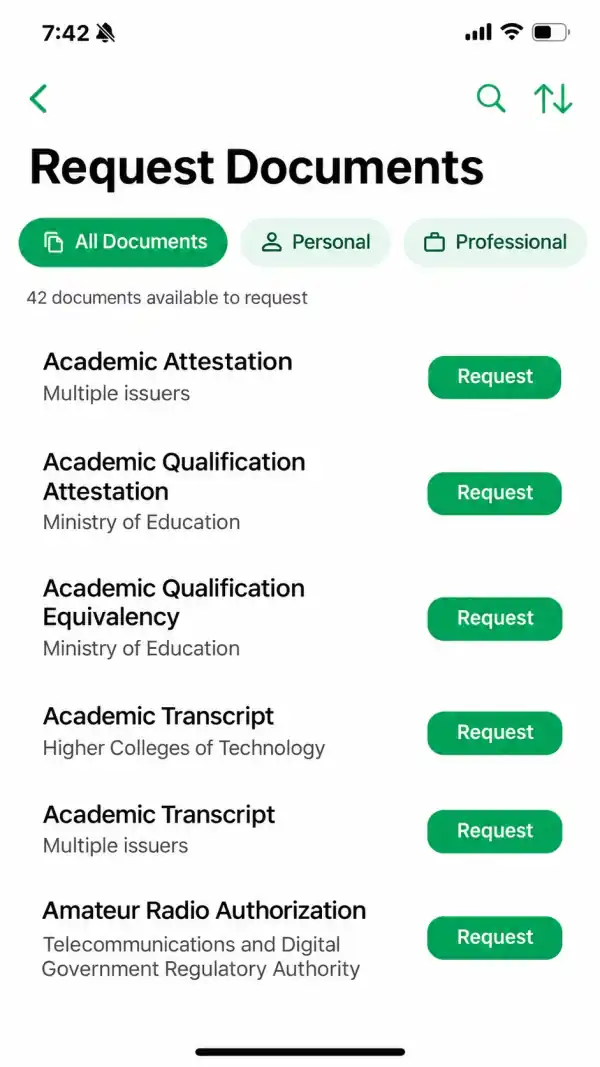
Find the document you need
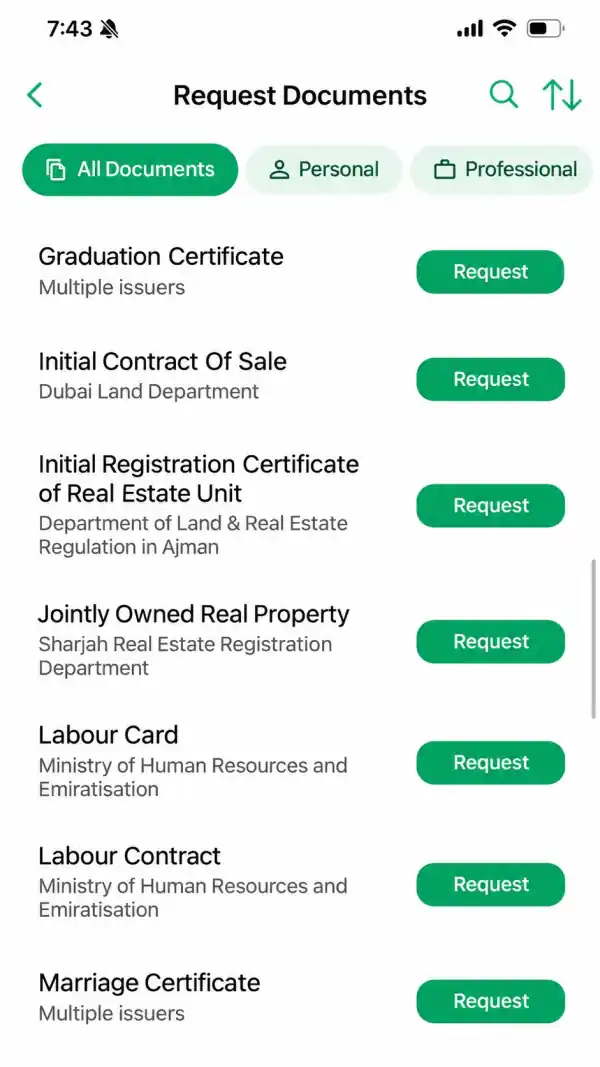
The Request Documents list opens. Use the search control or scroll through the available documents to find Labour Card.
- 04
Request Labour Card from MoHRE
Find Labour Card with Ministry of Human Resources and Emiratisation shown as the issuer. Select its Request button.
- 05
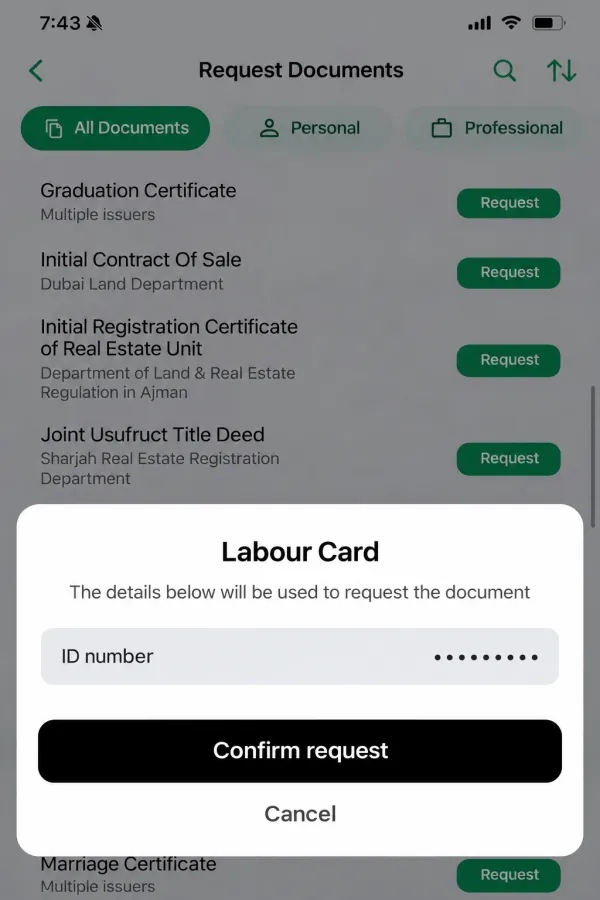
Confirm your request
Review the identity details shown on your own device. If they are correct, select Confirm request and follow the app’s prompts.
- 06
Open the issued Labour Card
Return to Documents and look for the issued Labour Card. Open it to view the available document and its details. Availability depends on the record returned by the issuer.
How to Download or Print Your UAE Labour Card?
Use the print service to retrieve the available electronic work permit and keep a PDF copy or printout.
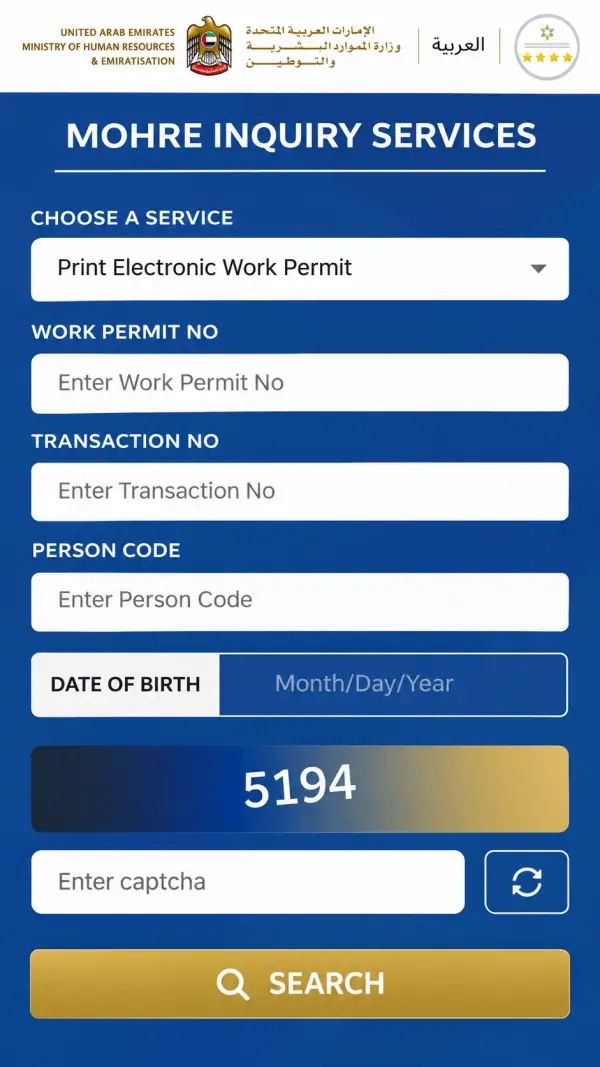
- 01
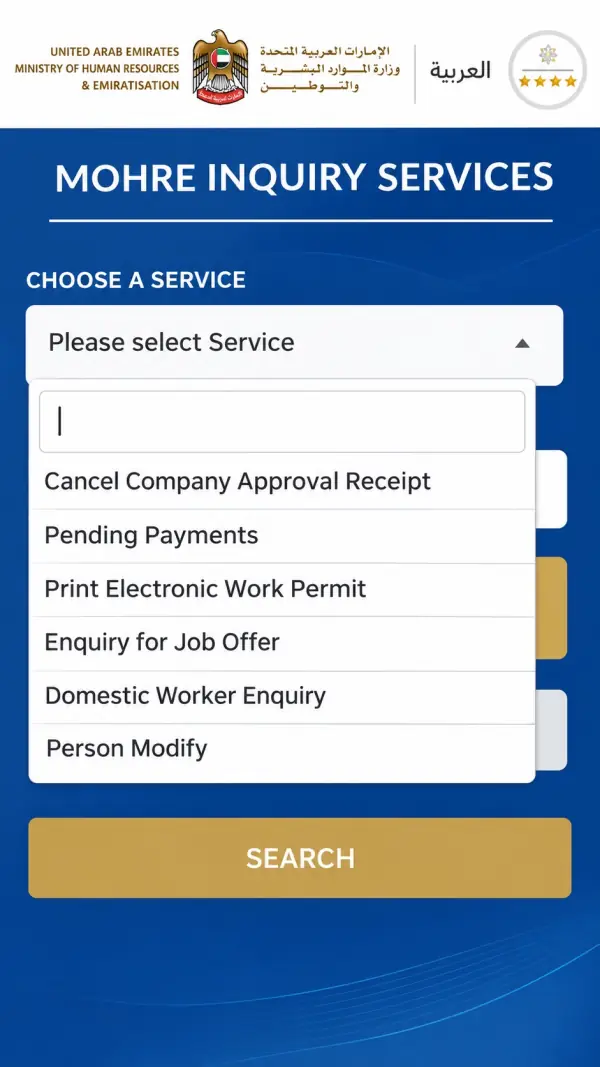
Choose Print Electronic Work Permit
Open the MoHRE Enquiry Portal. In Choose a Service, select Print Electronic Work Permit.
- 02
Fill in the requested fields
Enter the work permit number, transaction number, person code and date of birth requested by the form. Use your own employment records and follow the fields shown on the current page.
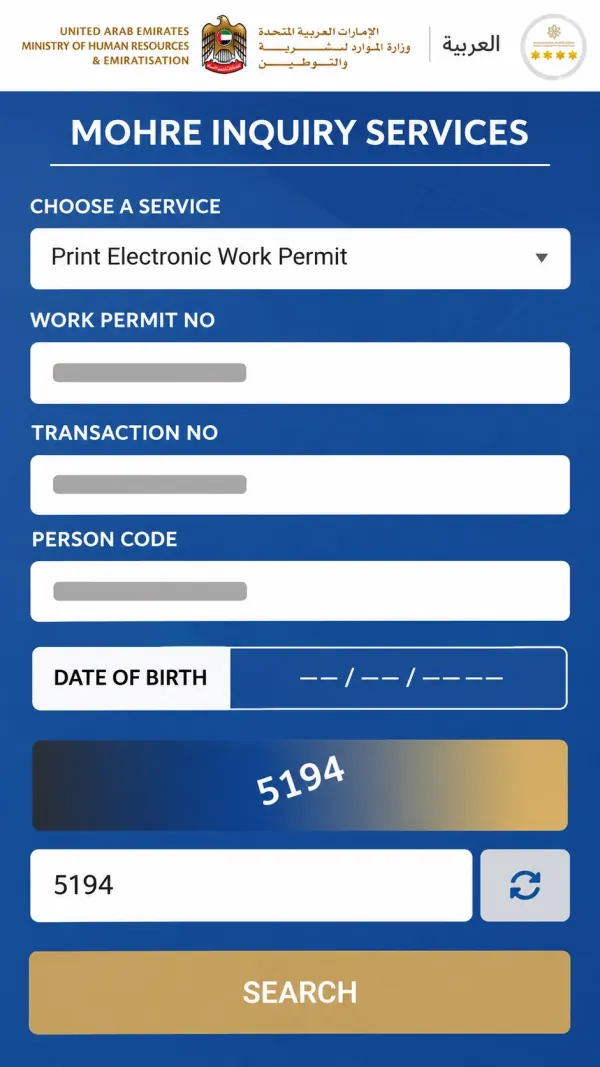
- 03
Complete verification and select Search
Enter the security code displayed on your own page, then select Search. Review the returned document before opening the print or PDF preview.
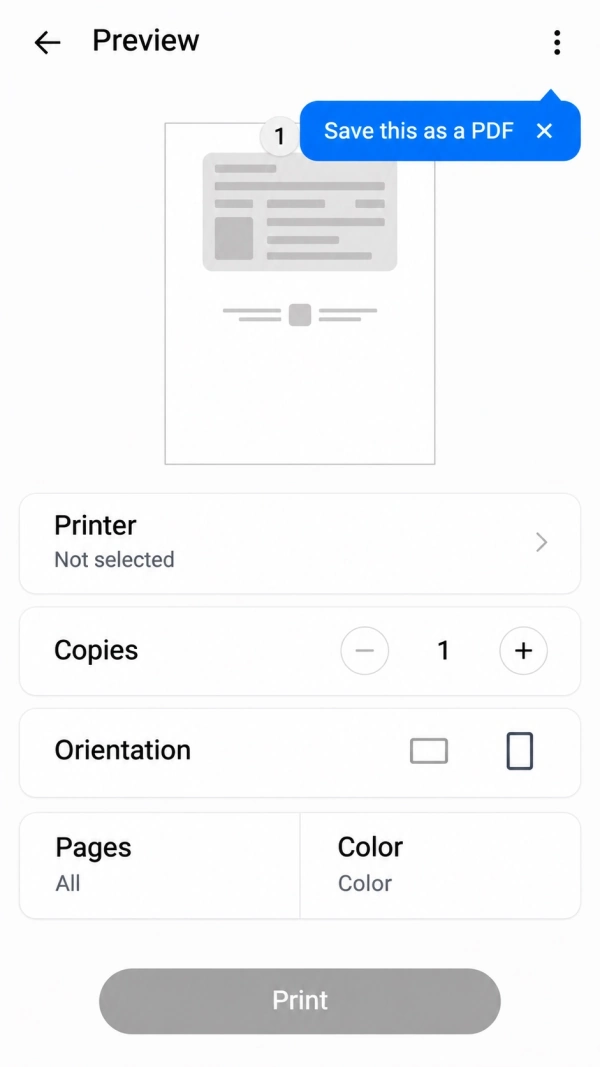
- 04
Save the PDF or print a copy
In the print preview, choose Save as PDF if available, or select a printer. Save the document to your device or complete the print action. The preview controls depend on your phone or browser.
What is a Labour Card in the UAE?
The UAE labour card is an official employment record of people working in the UAE. It is issued by the country’s work permit system. It is also known as an employment card or electronic work permit. This permit ensures that the person has authorization to work as an employee in the UAE.
All permits and these systems are managed by the Ministry of Human Resources and Emiratisation. With the advancement in technology, the labour card information is available electronically online at all times. So, employees do not always need a physical card.
Here is a precise list of what information a UAE labour card shows:
- Employee's full name and identification details
- Labour card or work permit number
- Employer or company name
- Job title and occupation
- Work permit issue and expiry dates
Eligibility Criteria for UAE Labour Card
Not every person living in the UAE automatically deserves or receives a labour card. It is issued to eligible employees after their employer completes the required work permit application process.
Here is a list of eligibility criteria to apply for labour card in the UAE:
- Applicants must have a genuine employment offer from a UAE employer.
- Applicants must be sponsored by an employer.
- Employees should be at least 18 years of age.
- Applicants must provide a valid passport and required identification documents.
- Foreign workers should meet the applicable medical fitness requirements.
- Applicants must have educational certificates, professional licences, or other supporting documents according to the job.
- Employees must have an employment contract with the employer.
Conclusion
The process to check the labour card status in the UAE is simple and quick. You can use the MoHRE online portal or their mobile application to check the status online.
Besides that, you can also use UAE Pass to access the supported document services and view your employment information. The online service will allow you to see details about your card expiry date, pending status, and more. If everything is fine, you can download or print an electronic copy.
Open Gratuity CalculatorFrequently Asked Questions
01Is it free to check labour card status through MOHRE?
Yes. It is completely free to check your UAE labour card status from the MoHRE portal.
02How long does it take to get a UAE labour card?
The exact processing time depends on the permit category and application requirements. Some applications may be processed within a few working days, while some may take extra time.
03What is the UAE work permit?
UAE work permits and labour cards are almost similar. So, a work permit is also an authorization for a person to work legally in a country.
04What should I do if my UAE labour card status shows pending?
If your pending status appears, you should contact your employer or HR department to confirm the problem. You may need to provide documents, approvals, or other details to complete your work permit application.
05What is the difference between a UAE labour card and a residence visa?
A labour card allows a person to work legally in the country, while a residence visa allows an individual to live in the UAE.